Vision
About vision
Vision is a key piece of the development in the LARC VSSS competition, with a deep integration of OpenCV and custom cuda kernels, we are able to find the position and orientation of the elements in the field. This information can be used to coordinate the robots in a match.
Objective
The robots contain a color code or an aruco on the top, by using a camera it is possible to identify the robot.
There are two different types of identifications marks used in different environments. Although the identification
marks are different, the calibration, image preprocessing and color detection remains the same, the only thing that
is different depending on which identification marks are being used is the classification, therefore in the
classification subsection there will be two different approaches depending on which identification marks are being used.
ARUCO vision

This type of identification marks are used in the Mexican Robotics Tournament (TMR).
Color vision
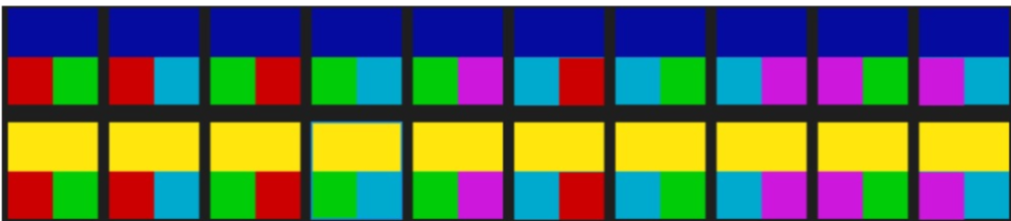
This type of identification marks will be used in the Latin American Robotics Competition (LARC)
Vision pipeline
The vision system follows a modular sequential pipeline
- Preprocessing: The frames are obtained and processed into standard contitions
- Calibration: Store calibrations of different colors in different lightning conditions to identify pixels.
- Identification: By using a set of algorithms, pixels are classified into colors
- Classification: Color patches are categorized into real field objects (robots and ball)
- Tracking: Transform pixel coordinates into real world coordinates, track and predict position of infield objects
- Integration: Message publishing and integration with the rest of the system
Tools & Libraries
- C++17
- OpenCV 4.13.0
- CUDA 12.8.0
- ROS Humble (Desktop-Full)
- Docker (NVIDIA Container Toolkit)
- Python 3.10.12
Execution
Modifying parameters
The file vsss_ws/src/vsss_bringup/launch/vision.launch.py
contains execution parameters such as:
use_camera (boolean): If this flag is set to true, the program will use the camera to obtain images
simulator (boolean): If this flag is set to true, the program will wait for the vision/sim_image topic to
receive images
record_video (boolean): If this flag is set to true, the program will record a video and save it in the log
directory
debug_mode (boolean): If this flag is set to true, the program will show different images of the preprocessing,
identification, classification and tracking to make debugging easier
camera_id (string): This string contains the path to the camera device
file_path (string): If the use_camera and simulator flags are set to false, the program will use
the video in the file_path parameter.
Building & executing
The following instructions will build and execute the vision program with the desired parameters